
Want to publish customer-facing Confluence pages on your own domain?
Satori Cloud now lets you use a custom subdomain for public Confluence content such as customer documentation, knowledge bases, help centres, support documentation and product guides.
Instead of sending customers to a Satori Cloud URL, you can publish your Confluence content at an address such as:
docs.example.comhelp.example.comsupport.example.comknowledge.example.com
You continue writing and managing the content in Confluence. Satori Cloud publishes it as a customer-facing website using your own domain.
How it works
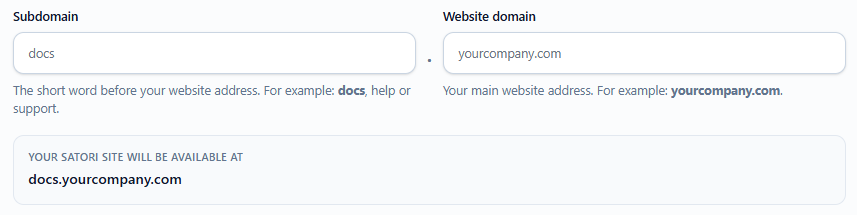
In your Satori Cloud site settings, enter:
The subdomain you want to use, for example
docsYour website domain, for example
example.com
Satori will then prepare the connection for:
docs.example.com
Once the domain is ready, Satori will show you the DNS records that need to be added to your domain.
You, your IT team, or whoever manages your DNS can add these records through your domain provider, such as Cloudflare, GoDaddy or AWS Route 53.
Once the records have been added and the connection has been verified, your Satori Cloud site will be available directly from your own domain.
Your documentation, on your website
This means your customers can visit:
docs.example.com
rather than a Satori Cloud URL.
You can continue writing and managing your documentation in Confluence while publishing it as part of your own website and brand.
Satori handles the published site and HTTPS connection, while your existing domain remains under your control.
Changing your domain
If you decide to move your documentation to another subdomain later — for example from:
docs.example.com
to:
help.example.com
you can update it in Satori Cloud and connect the new address.
Ready to publish Confluence pages on your own domain?
Use Satori Cloud to turn Confluence content into customer-facing documentation, knowledge bases and help centres on your website.