
Satori Cloud can now automatically prepare your published sites for Google and other search engines.
Turn on search engine visibility and Satori will automatically manage:
Your XML sitemap
robots.txtCanonical URLs
Sitemap updates when pages are published or removed
Why use this?
If you publish customer docs, developer docs, release notes, help content, or other public information, you may want people to find it through Google.
Satori now handles the technical SEO setup for you.
How to turn it on
Open your published site in Satori Cloud.
Go to:
Site settings → Search engines
Enable:
Allow this site to appear in search engines
Then click:
Save search settings
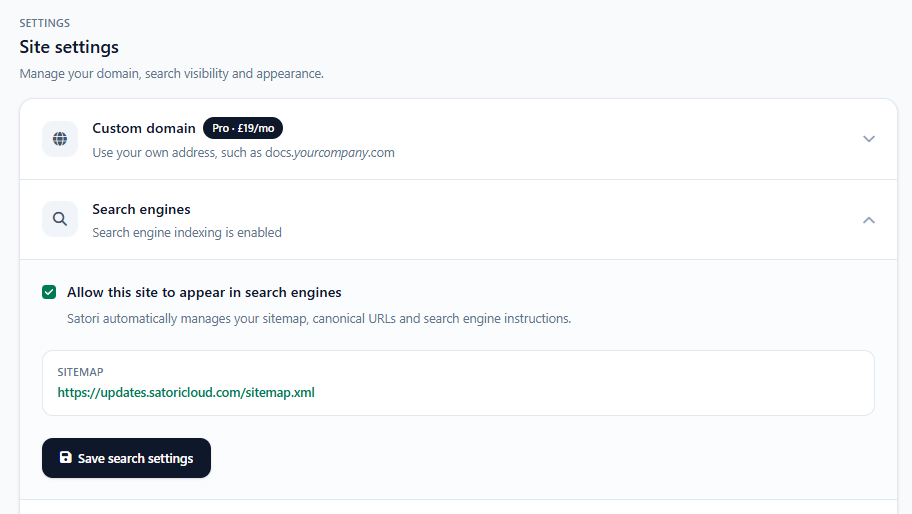
Your sitemap
Satori automatically creates a sitemap for the site.
For example:
https://docs.example.com/sitemap.xml
It stays up to date automatically as you publish or remove pages.
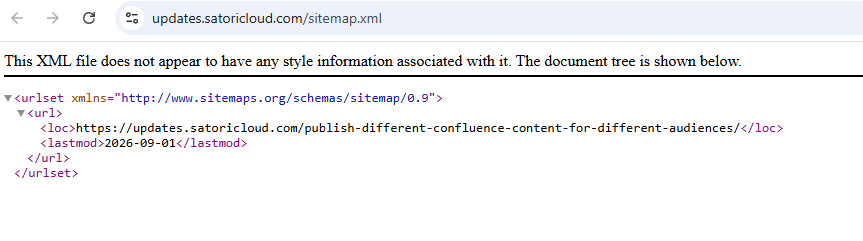
Optional: Google Search Console
You do not need Search Console for this feature to work.
If you want to monitor how Google is indexing your site, you can submit the sitemap to Google Search Console.
Open Google Search Console
Select your website
Open Sitemaps
Enter your Satori sitemap URL
Click Submit
For example:
https://docs.example.com/sitemap.xml
You only need to submit it once. Satori keeps the sitemap updated after that.
Turning indexing off
You can disable search visibility at any time from:
Site settings → Search engines
This tells search engines not to index the published pages.
Ready to make your Confluence content discoverable in Google?
Publish customer documentation, help content, release notes and other public Confluence pages with Satori Cloud, with the SEO setup handled for you.